
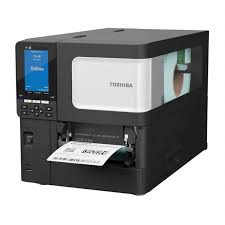
A barcode printer is an essential tool for businesses that need to print product labels, shipping labels, inventory tags, and price stickers. From retail shops and supermarkets to warehouses, pharmacies, and manufacturing companies, barcode printers help businesses organize products, track inventory, and improve daily operations.
If you are searching for a barcode printer, understanding the available types, features, prices, and uses can help you make the right decision. In this guide, we will explain how barcode printers work, which models are popular, what factors affect their prices, and how to choose the best printer for your business.
What Is a Barcode Printer?
A barcode printer is a specialized printing device that produces labels containing barcodes, product information, prices, serial numbers, or tracking details. These labels can be scanned using a barcode scanner or compatible mobile device.
Unlike ordinary office printers, barcode printers are designed to produce clear, consistent labels that barcode scanners can read accurately. They are commonly used in retail, logistics, healthcare, manufacturing, and e-commerce.
Businesses use barcode printers to print product labels, warehouse identification tags, shipping labels, asset labels, and inventory stickers. Choosing the right printer can save time, reduce labeling errors, and support better inventory management.
What Are the Different Types of Barcode Printers?
Before purchasing a barcode printer, it is important to understand the main technologies available.
1. Direct Thermal Barcode Printers
Direct thermal printers create images on specially coated thermal paper using heat. They do not require a separate ink cartridge or thermal transfer ribbon.
These printers are suitable for applications such as shipping labels, delivery receipts, and short-term product labels.
Advantages:
- Simple operation and maintenance.
- No thermal transfer ribbon required.
- Suitable for high-volume, short-term labeling.
However, direct thermal labels can fade when exposed to heat, sunlight, or friction. They may not be the best choice for products requiring long-lasting labels.
2. Thermal Transfer Barcode Printers
Thermal transfer printers use heat to transfer ink from a ribbon onto a label. Depending on the ribbon and label material, they can produce durable prints suitable for longer-term applications.
These printers are commonly used for warehouse labels, product identification, manufacturing, and asset tracking.
Advantages:
- Supports a variety of label materials.
- Can produce long-lasting labels.
- Suitable for many industrial and commercial applications.
Although thermal transfer printers require ribbons, they offer greater flexibility for businesses that need durable labels.
3. Desktop Barcode Printers
Desktop barcode printers are compact devices designed for small and medium-sized businesses. They are commonly used in retail shops, pharmacies, offices, and small warehouses.
Their smaller footprint makes them convenient for counters and workstations where space is limited.
4. Industrial Barcode Printers
Industrial barcode printers are designed for demanding environments and higher printing volumes. They typically offer more robust construction and larger label and ribbon capacities than desktop models.
Warehouses, distribution centers, manufacturing facilities, and logistics companies may benefit from industrial printers when printing large numbers of labels every day.
What Is the Barcode Printer Price in Pakistan?
The barcode printer price in Pakistan depends on the brand, printing technology, resolution, connectivity, printing speed, and intended workload.
As a general budgeting guide, entry-level desktop models may cost around PKR 15,000–35,000, while more advanced desktop printers may fall around PKR 35,000–80,000. Industrial models can cost considerably more, potentially exceeding PKR 100,000.
These are indicative budget ranges, not verified live quotations. Actual prices can change with exchange rates, availability, taxes, accessories, and supplier warranties.
Before purchasing, compare the complete cost of the printer, labels, ribbons if required, replacement parts, and maintenance.
Which Barcode Printer Brands Are Popular?
Several manufacturers offer barcode printers for different business requirements.
Zebra Barcode Printers
Zebra is a widely recognized brand offering desktop, mobile, and industrial barcode printing solutions. Its printers are used for product labeling, shipping, inventory management, and warehouse operations.
TSC Barcode Printers
TSC offers barcode printers for retail, logistics, manufacturing, and other commercial applications. Depending on the model, businesses can choose compact desktop devices or printers designed for heavier workloads.
Honeywell Barcode Printers
Honeywell provides printing solutions for retail, healthcare, transportation, and industrial environments. Businesses should compare the specifications of individual models to find the right fit.
Xprinter Barcode Printers
Xprinter offers printing equipment used in retail, billing, shipping, and label printing. Some models are designed for businesses seeking an economical desktop solution.
The best brand depends on your budget, required printing volume, label size, software compatibility, and access to local technical support.
How Do You Choose the Best Barcode Printer for Your Business?
Choosing the right barcode printer starts with understanding your daily requirements.
1. Identify your printing volume: A small shop printing a few hundred labels daily may need a desktop printer, while a large warehouse may require an industrial model.
2. Choose the correct printing technology: Direct thermal printing works well for many short-term labels. Thermal transfer printing is often preferable when labels must withstand demanding conditions.
3. Check label size: Make sure the printer supports the width and length of the labels you intend to use.
4. Consider connectivity: USB is common for workstation printing. Ethernet, Wi-Fi, or Bluetooth may be useful when multiple devices or mobile workflows are involved, depending on model support.
5. Review print resolution: Standard resolution may be sufficient for ordinary product labels. Smaller barcodes and detailed graphics may benefit from higher resolution, depending on the label design and scanning requirements.
6. Verify software compatibility: Check whether the printer supports your inventory software, billing system, shipping platform, and operating system.
7. Consider long-term costs: Compare label and ribbon prices, warranty coverage, maintenance requirements, and local availability of replacement parts.
Where Can You Buy a Barcode Printer in Pakistan?
You can purchase barcode printers from specialist barcode equipment suppliers, computer hardware stores, and online technology retailers.
Before placing an order, ask the seller to confirm the exact model, printing technology, supported label width, connectivity options, warranty, and included accessories. If possible, request a demonstration using your intended label material.
You can explore the following resources:
- Zebra Technologies: https://www.zebra.com/
- TSC Auto ID: https://www.tscprinters.com/
- Honeywell Productivity Solutions: https://automation.honeywell.com/
These official websites can help you review product specifications and identify models suitable for your business.
Why Is a Barcode Printer Important for Modern Businesses?
Barcode printers help businesses improve the accuracy and consistency of product identification. When used with compatible scanners and inventory software, they can make stock tracking and order processing more efficient.
Retailers can print price labels, warehouses can identify storage locations, and e-commerce businesses can produce shipping labels. Manufacturers can also label products with batch numbers, serial numbers, and other tracking information.
A barcode printer is a valuable investment for businesses that want to improve labeling, inventory management, and product tracking. Options range from affordable desktop printers to high-capacity industrial models, with different technologies and features available for different applications.
When comparing the barcode printer price in Pakistan, consider printing volume, label durability, connectivity, resolution, and ongoing consumable costs. Comparing specifications and checking local warranty support can help you choose a reliable printer that meets your business needs.
Frequently Asked Questions (FAQs)
1. What is a barcode printer used for?
A barcode printer produces labels containing barcodes, product names, prices, shipping information, serial numbers, and inventory details. These labels can be scanned using compatible barcode scanners.
2. What is the barcode printer price in Pakistan?
Entry-level desktop models may cost approximately PKR 15,000–35,000, while advanced desktop and industrial printers can cost more. Prices depend on the model, features, availability, and supplier.
3. Which barcode printer is best for a small shop?
A compact desktop barcode printer is often suitable for a small retail shop. Choose a model based on your daily printing volume, label size, software compatibility, and budget.
4. What is the difference between direct thermal and thermal transfer printers?
Direct thermal printers use heat-sensitive labels and do not require a ribbon. Thermal transfer printers use a ribbon to create images on labels and can provide greater durability with suitable materials.
5. Can a barcode printer print price labels?
Yes. Barcode printers can print product prices, names, stock codes, and barcodes on compatible labels. The layout can usually be configured using supported label-design software.
6. Do barcode printers require ink?
Most dedicated thermal barcode printers do not use conventional ink cartridges. Direct thermal models use heat-sensitive labels, while thermal transfer models use ribbons.
7. Which barcode printer brand is best?
Zebra, TSC, Honeywell, and Xprinter are among the brands worth comparing. The best choice depends on your workload, required features, budget, and local service availability.
8. Can I connect a barcode printer to my computer?
Yes. Many barcode printers connect through USB, while selected models also support Ethernet, Wi-Fi, or Bluetooth. Always check the connectivity options of the specific model.
9. Are barcode printers suitable for warehouses?
Yes. Desktop printers can handle smaller labeling requirements, while industrial printers are designed for higher volumes and demanding warehouse or manufacturing environments.
10. What should I check before buying a barcode printer?
Check the printing technology, maximum label width, resolution, speed, connectivity, software compatibility, warranty, consumable costs, and availability of technical support.
Leave a Reply